You can reply to social media comments in your brand's voice by writing the voice down in a few lines, keeping a list of approved answers, replying by type of comment and passing anything sensitive to a named person. The steps below show how, with example replies you can adapt.
Why do replies matter?
A comment is often the first conversation someone has with your business. A prompt, friendly and accurate reply shows that someone is listening. It also answers the question for everyone else who is reading, which is why a good reply is worth more than one conversation.
How do you describe your brand's voice?
You do not need a long style guide. Five short lines are enough to keep replies consistent, whoever writes them.
- Three words that describe how you sound, such as friendly, clear and direct.
- Words and phrases you like to use.
- Words and phrases you avoid.
- How you greet people and how you sign off.
- Whether you use emojis, and how many.
How do you build a list of approved answers?
Collect the questions you answer most often and write one good reply to each. Keep them in a shared document so anyone replying uses the same wording.
- Opening hours, location and how to reach you.
- How an order, booking or enquiry works.
- Where to find prices, which is usually a link, so the answer never goes out of date.
- How to book or ask for a quote.
- A thank-you for praise.
- A calm reply to a common complaint, with the next step.
How do you reply to each type of comment?
Sorting comments by type makes replies quicker and more consistent.
- Praise: thank the person, mention something specific and keep it short.
- Question: answer directly, add a link if it helps and invite a follow-up.
- Complaint: acknowledge it, apologise for the experience without arguing and move the conversation to a private message or email.
- Possible customer: answer, then pass it to the person who follows up on leads.
- Spam or abuse: do not engage. Hide or report it according to your own rules.
What do example replies look like?
These are short and can be adapted to your voice.
Praise: "Thank you, that made our day. We are glad it worked well for you."
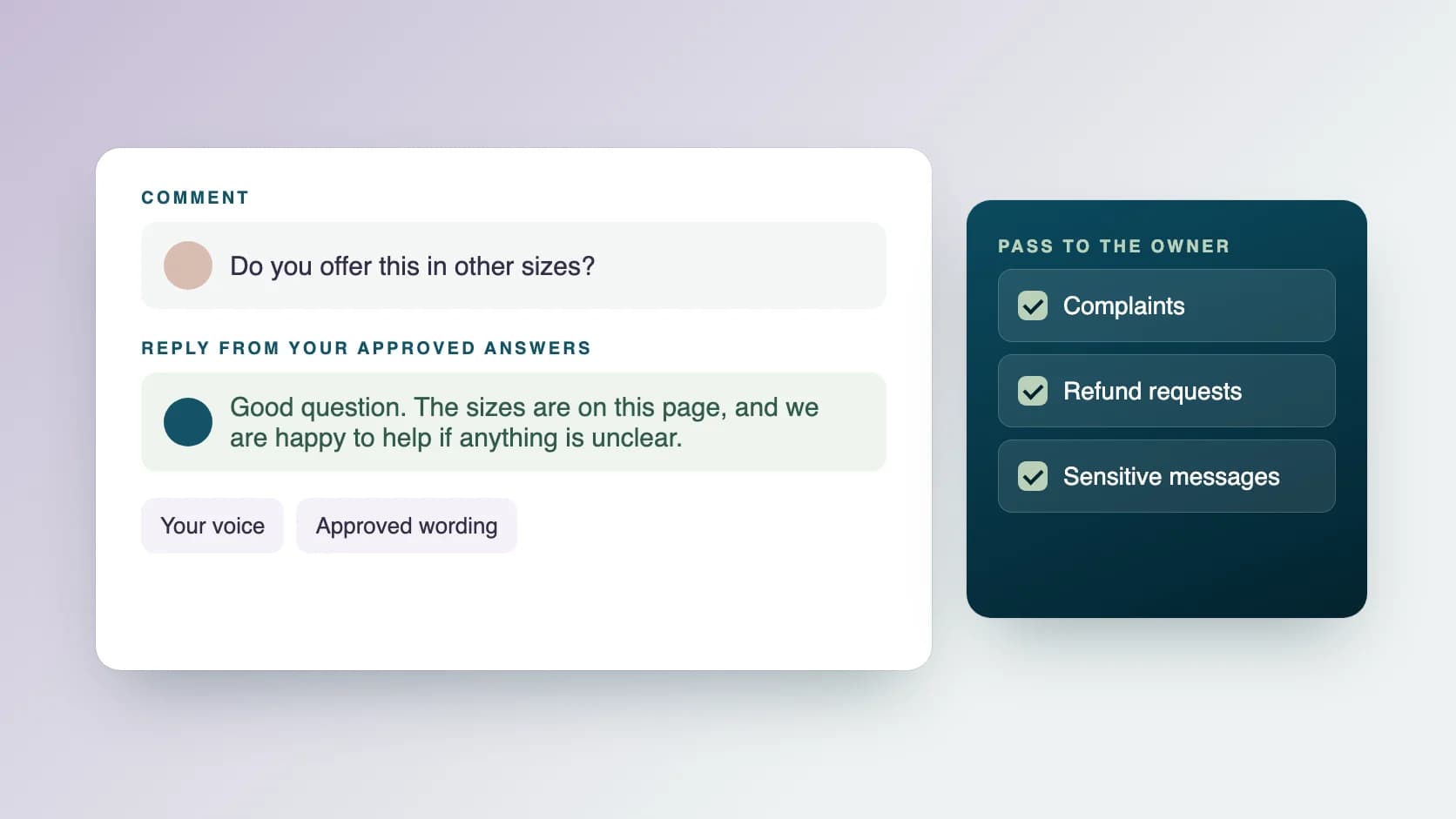
Question about how it works: "Good question. The short version is on this page: [link]. If anything is unclear, send us a message and we will help."
Complaint: "We are sorry this was not what you expected. Please send us a private message with the details so we can look into it."
When should you reply?
Set a regular time to check comments and messages, for example at the start and end of the working day, and write it down. Replying on a schedule is easier to keep than replying whenever a notification appears, and it tells your audience roughly when to expect an answer.
What should you pass to the owner?
Some messages should never be answered from a list. Agree in advance that these go to a named person.
- Complaints about a product, an order, billing or safety.
- Refund requests.
- Legal questions or threats.
- Anything involving personal or account details.
- Press or partnership enquiries.
- Anything you are not sure about.
How can AI help with replies?
AI tools can draft a reply from your approved answers faster than writing from scratch. The draft still needs a person. Check that it answers the question that was asked, that it matches your voice and that it makes no promise you have not approved. Never let an AI tool answer a complaint or a sensitive message without a person reading it first.
What mistakes should you avoid?
These cause most problems with replies.
- Copying the same reply under every comment, which looks automated.
- Arguing in public.
- Promising refunds, dates or outcomes you have not approved.
- Replying in a different tone from the rest of your channel.
- Leaving questions unanswered for days.
What can an assistant take off your plate?
Replying on a schedule is a good job to delegate. With community management at Ragiles, an assistant answers comments and messages in your voice from your approved answers, keeps the answer list current, flags unanswered messages each day and passes questions, possible leads, complaints and sensitive messages to you. Every AI draft is checked by a person, and no unapproved commitments are made. Prices start at $5 an hour, with no onboarding fee. To keep your channels active as well, see how to plan a week of social media posts.
Common questions
How fast should I reply? As quickly as you can keep up reliably. A steady reply time matters more than an instant one.
Should I reply to every comment? Reply to questions and complaints. Short thanks for praise are good, and you do not need to answer every emoji.
Should I delete negative comments? Reply politely and take the conversation private. Remove only spam, abuse or content that breaks your own rules.
Can one person reply for several people on my team? Yes, if everyone shares the same voice notes and approved answers.
Can AI reply for me? AI can draft replies. A person should read and approve them, and pass sensitive messages to you.