A job application tracker is a simple table that records every application, its status and the next step. Updated the same day an application is sent or a reply arrives, and reviewed once a week, it keeps follow-ups from slipping and shows what is working. Eleven columns and six statuses are enough.
Why should you track your job applications?
Without a record, you forget which resume you sent, who you spoke to and when to follow up. A tracker turns a pile of applications into a list of next steps. It also shows patterns, such as which platforms and resume versions lead to replies.
Which columns does a tracker need?
Use these eleven columns. You can add more later, but start small.
- Company and Role.
- Link: the address of the posting, because postings disappear.
- Date applied.
- Platform: where you found and applied for it.
- Resume version: the file name you sent.
- Contact: a person's name, if you have one.
- Status: one value from the list below.
- Next step and Next step date.
- Notes: anything you want to remember.
What can you paste into a spreadsheet?
Paste this header line into the first row, then use your spreadsheet's option to split the text into columns at each comma.
Company,Role,Link,Date applied,Platform,Resume version,Contact,Status,Next step,Next step date,Notes
Which statuses should you use?
Keep the list short, and use it the same way every time.
- Saved: you plan to apply.
- Applied: you sent the application.
- Replied: someone responded.
- Interview: an interview is scheduled or done.
- Offer: you received an offer.
- Closed: rejected, withdrawn or no reply after follow-ups.
What do sample rows look like?
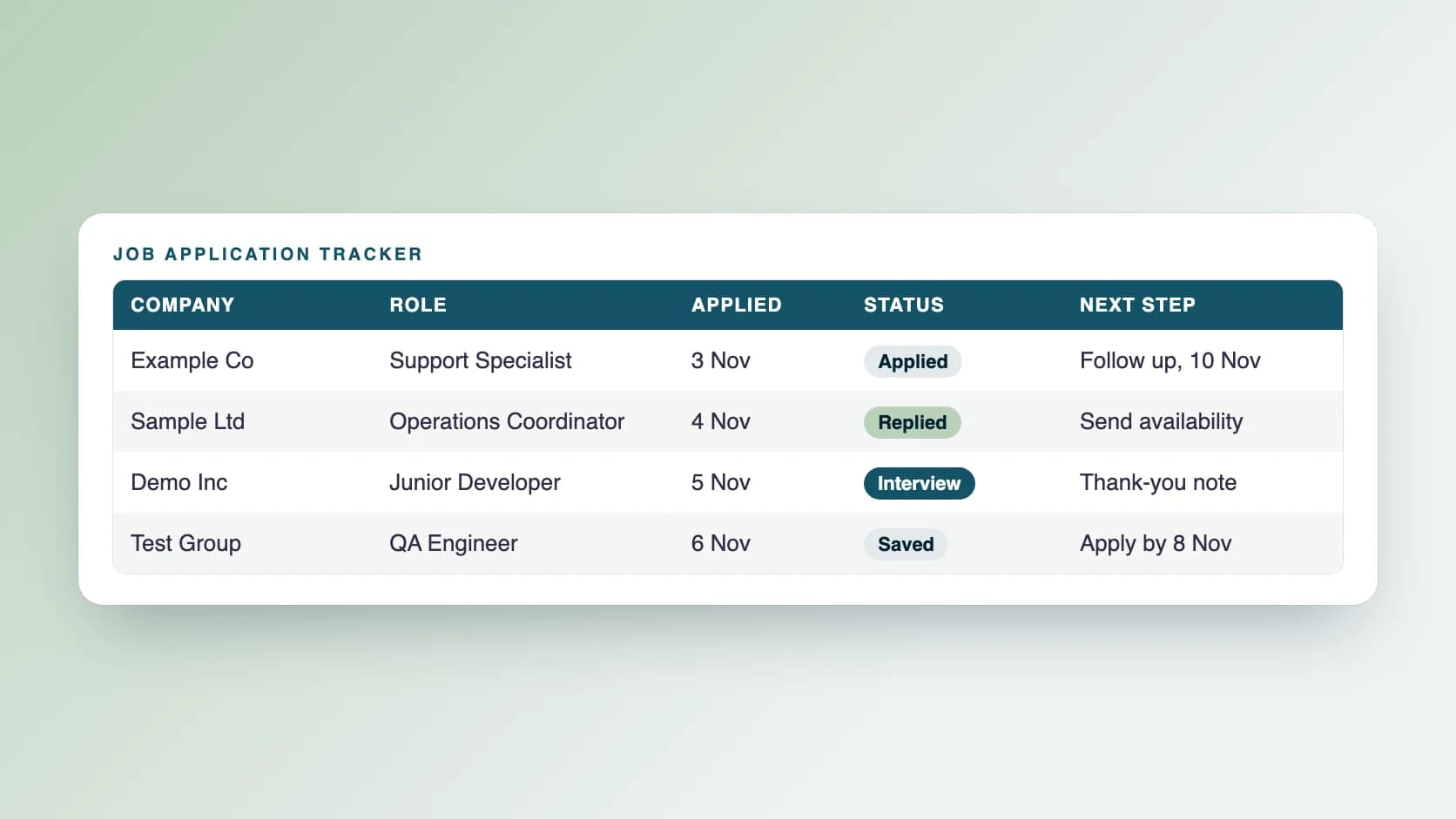
These rows are examples, not real companies.
- Example Co, Support Specialist, link, 3 Nov, job board, Name-Support-v2, none, Applied, follow up, 10 Nov, matched on Zendesk and chat.
- Sample Ltd, Operations Coordinator, link, 4 Nov, company site, Name-Ops-v1, Alex (recruiter), Replied, reply with availability, 6 Nov, call asked for Thursday.
- Demo Inc, Junior Developer, link, 5 Nov, referral, Name-Dev-v3, none, Interview, send thank-you note, 12 Nov, technical interview on Tuesday.
How do you keep the tracker useful?
Follow three habits.
- Update it the same day you apply or hear back.
- Set a next step date for every open row, and check them each morning.
- Review it once a week: sort by next step date, close old rows and note what to change.
What can you learn from it?
After a few weeks, look at which resume versions and platforms get replies, and which roles lead to interviews. Use that to adjust your next applications, not to draw firm conclusions from a small number of rows.
How should you follow up?
Use your Next step date. If the posting gave a date, wait until it passes, then send one short, polite message. Our guide on making your application easier to review has tips.
What mistakes make a tracker useless?
Most trackers fail for simple reasons.
- Updating it once a week from memory instead of as you go.
- Too many columns, so it feels like a chore.
- No next step dates, so nothing prompts a follow-up.
- Not saving the link or the resume version.
- Keeping applications in email, notes and a spreadsheet at once.
How do you keep a tracker manageable when you apply a lot?
Use filters and colour sparingly. Filter by status to see only open rows, and sort by next step date each morning. Archive closed rows into a second sheet every few weeks, so the main sheet stays short.
How does Ragiles handle tracking?
With Ragiles career support, our team sends at least 200 job applications a day on different job platforms, Monday to Saturday, with AI speeding up the work and a person sending each one. On request, we can share the log, tracker and screenshots of what was sent. We cannot promise a job offer. See the career support page.
Common questions
Should I use a spreadsheet or an app? A spreadsheet is enough. Use whatever you will actually keep updated.
How often should I update the tracker? Daily, as you apply and as replies arrive.
Do I need a different tracker for different roles? No. Add a Role type column if you apply to several kinds of jobs.